AI
Supplier Studio: add supplier data to Vellox with AI
Many of the figures that drive your profitability aren't in the ERP system. With the new Supplier Studio you can bring them into Vellox, starting with supplier rebates.

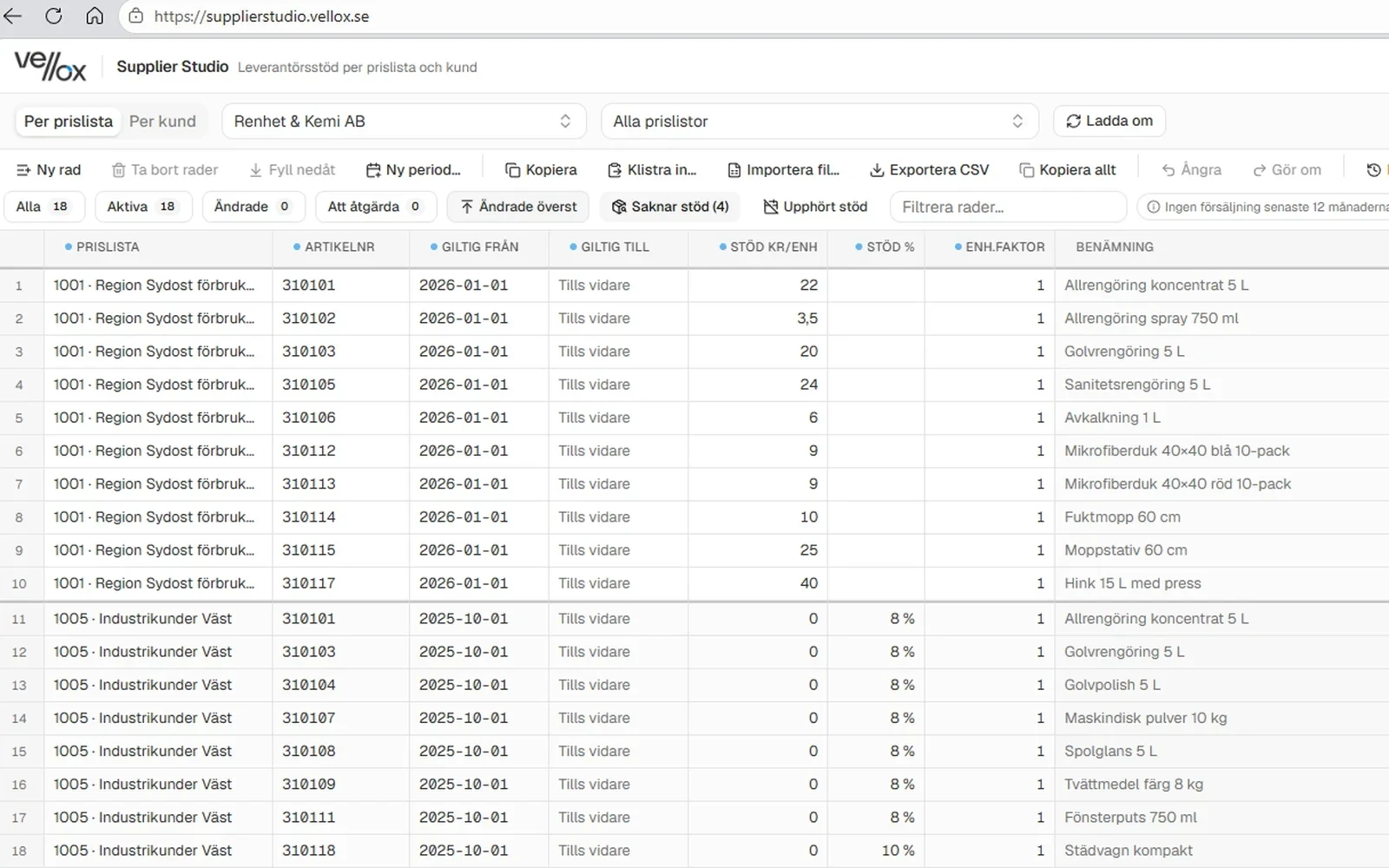
In short
- Supplier Studio is a new part of the Vellox customer portal we are currently building.
- The first feature is Supplier Rebates, released this week.
- You paste in or import files from your suppliers, and AI helps interpret and match the data.
- Budgets, bonuses, account groupings, campaigns, item groupings and cost mark-ups will follow.
- The feature is available in the latest version of Vellox.
The data missing from your ERP system
Your ERP system shows what you have sold and bought. But understanding the true margin usually takes more: supplier rebates, campaign terms, customer bonuses, your own item groupings or cost mark-ups. That information often sits in Excel files, PDFs and emails.
Many of our customers already load such data into Vellox. Now we are making it easier with a web-based tool.
This is Supplier Studio
Supplier Studio is a new part of the Vellox customer portal. Here you manage the data you want to add to your analysis. It connects to the same semantic model as the rest of your data from your ERP (Business Central, Jeeves, Monitor, Pyramid, Visma and more), so you avoid side calculations in your own spreadsheets. See which analysis modules in Vellox supplier rebates can be used in.
Supplier Studio builds on the new AI capabilities we are developing for Vellox. Read more about how to prompt your business data with AI.
First out: Supplier Rebates
This week we are releasing the first feature, Supplier Rebates.
Paste or import
You can paste a table directly or import the file you received from the supplier. There is no need to convert it to a fixed template first.
AI interprets and matches
The AI support helps recognise columns such as item, supplier, amount and period, and matches the rows to the right items in Vellox. You review and approve as needed before the data is loaded.
Supplier rebates appear in your analysis
Once the rebates are loaded, they are available in the Vellox analysis. You can see the margin after supplier rebates by item, supplier and customer, and visualise or prompt just as with any other data. See 10 questions you can ask your own business data.
What comes next
Supplier Studio and other studios will be expanded over time in our customer portal with more types of complementary data. Here are a few examples to give you ideas of what's possible:
-
Budgets (see also How to prompt your system data – from customer list to budget)
-
Campaign management
-
Account grouping
-
Customer bonuses
-
Item groupings
-
Cost mark-ups
Frequently asked questions about Supplier Studio
What is Supplier Studio?
Supplier Studio is part of the Vellox customer portal where you add data that complements your analysis, such as supplier rebates.
Which features are available from the start?
Supplier rebates are available from the start. Budgets, campaign management, account groupings, customer bonuses, item groupings and cost mark-ups will be added over time.
Which file formats can I use?
You can paste data directly or import files from your suppliers.
Do I need to reformat the supplier's file before importing?
No. The AI support helps interpret the columns and match them to the items in Vellox, and you review the result as needed before it is loaded.
How do I get access to Supplier Studio?
Supplier Studio is available in the latest version of Vellox. Contact us if you would like to upgrade.